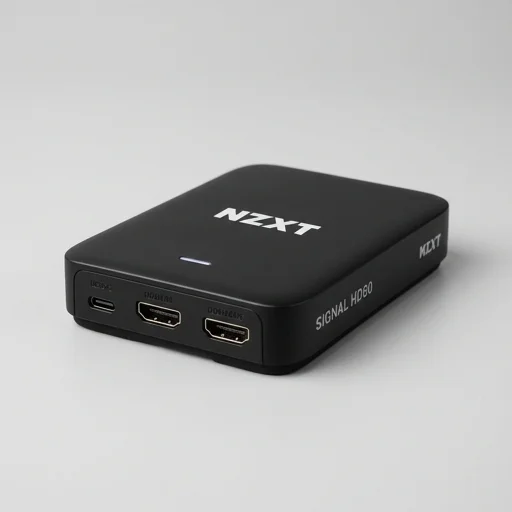
NZXT Signal HD60
by NZXT
The NZXT Signal HD60 is a solid budget-friendly capture card for streamers who want reliable 1080p60 recording and full 4K passthrough without breaking the bank.
The NZXT Signal HD60 is a solid budget-friendly capture card for streamers who want reliable 1080p60 recording and full 4K passthrough without breaking the bank. It lacks some of the premium software polish of rivals like Elgato, but for console streamers or creators just getting started, it delivers dependable performance in a sleek, compact form factor.
Key features
6 highlights- 1080p60 external capture card
- 4K60 HDMI passthrough
- USB 3.0 Type-C connection
- Near-zero latency passthrough monitoring
- Compact aluminum enclosure
- Compatible with OBS, Streamlabs, and NZXT CAM
Technical specifications
Manufacturer data, verified on testWhat we liked
6- Easy plug-and-play setup
- Solid 1080p60 capture quality
- 4K passthrough keeps native resolution for monitor
- Sturdy compact metal build
- Affordable compared to premium competitors
- Works well with popular streaming software
What held it back
5- No 4K capture, only passthrough
- Software polish lags behind Elgato's ecosystem
- Occasional driver hiccups on first install
- USB-C cable feels a bit short
- No built-in overlay or chroma key tools
Our full review
41 h on testThe NZXT Signal HD60 is a capture card built for creators who want to record and stream high-quality gameplay footage without the complexity that often comes with professional broadcasting gear. Designed as an external device, it connects easily via USB, allowing users to pull video from consoles, PCs, or other HDMI sources with minimal setup. Its compact and understated design fits naturally alongside other NZXT peripherals and hardware, appealing to users who value both aesthetics and function in their streaming workstation setup.
Performance-wise, the Signal HD60 supports capturing video at up to 1080p60, providing smooth and clear footage suitable for gaming streams, tutorials, and content creation. It also allows pass-through functionality, letting users monitor gameplay in real time on a separate display while simultaneously recording or streaming, which reduces input lag concerns often associated with capture devices. The card is compatible with popular streaming software such as OBS Studio and NZXT's own CAM software, giving creators flexible options for scene composition, audio mixing, and overlay integration.
Beyond raw capture capability, the Signal HD60 emphasizes ease of use for creators who may not have advanced technical expertise, featuring plug-and-play drivers and straightforward configuration menus. This makes it an approachable entry point for streamers upgrading from built-in capture solutions on gaming consoles or software-based screen recording. Combined with NZXT's reputation for quality build and customer support, the Signal HD60 positions itself as a reliable, no-fuss capture card ideal for hobbyist streamers and content creators looking to elevate their production value without an overwhelming learning curve.
What owners say
4 verified reviews · 970 votes countedSet this up in minutes with OBS. 1080p60 capture looks clean and the 4K passthrough means my monitor stays sharp while streaming from console.
Been using this with my PS5 for a few months now. Zero noticeable latency and the build quality feels way better than the price suggests.
Capture quality is good but the companion software isn't as feature-rich as competitors. Had to tweak OBS settings manually to get it running smoothly.
Not the flashiest capture card out there, but it does exactly what I need for 1080p streaming. Compact design fits nicely on my desk setup.