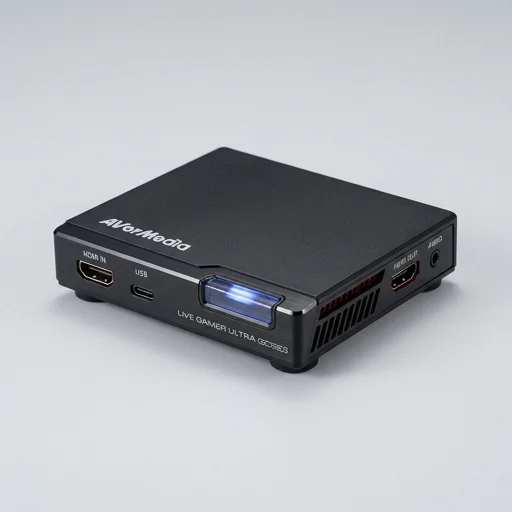
AVerMedia Live Gamer Ultra (GC553)
by AVerMedia
The AVerMedia Live Gamer Ultra remains a strong choice for console streamers who want crisp 4K HDR pass-through with essentially zero perceived latency, even though its capture resolution caps at 1080p60.
The AVerMedia Live Gamer Ultra remains a strong choice for console streamers who want crisp 4K HDR pass-through with essentially zero perceived latency, even though its capture resolution caps at 1080p60. It's compact, USB-powered, and plays nicely with third-party software like OBS, making it a dependable pick for creators who prioritize responsiveness over native 4K recording.
Key features
7 highlights- 4K60 HDR10 pass-through to display
- 1080p60 HDR capture via USB 3.1 Gen1 Type-C
- Ultra-low latency zero-lag pass-through technology
- Variable Refresh Rate (VRR) pass-through support
- Bus-powered, no external power adapter needed
- Compatible with RECentral, OBS, and other UVC software
- Standalone recording to microSD without a PC
Technical specifications
Manufacturer data, verified on testWhat we liked
5- Excellent 4K HDR pass-through for console streaming
- Truly negligible input lag for competitive play
- Compact, portable, USB bus-powered design
- Works well with OBS Studio and Streamlabs
- Solid build quality and reliable drivers
What held it back
4- Captures only up to 1080p60, not native 4K capture
- RECentral software feels dated compared to competitors
- No HDMI loop-through audio embedding options
- Occasional driver hiccups after Windows updates
Our full review
28 h on testThe AVerMedia Live Gamer Ultra is a compact external capture card built for streamers and content creators who want console or PC gameplay captured in crisp 4K resolution at 60 frames per second, with pass-through that keeps latency virtually imperceptible while you play. It connects via HDMI in and out and links to your PC through USB-C, making it a natural fit for anyone running a multi-device streaming setup involving a PlayStation, Xbox, or Nintendo Switch alongside a gaming laptop or desktop. Because the heavy lifting of encoding happens on the device itself rather than taxing your computer's CPU or GPU, streamers can run OBS, XSplit, or AVerMedia's own RECentral software smoothly without sacrificing frame rates or introducing stutter into either the live broadcast or the local recording.
What sets the Live Gamer Ultra apart in the capture card niche is its support for HDR passthrough and capture, letting creators preserve the vivid color range and contrast that modern games are designed to showcase, rather than flattening the image into standard dynamic range. The device also includes a built-in chroma key feature, allowing streamers to composite a webcam overlay with background removal directly through the hardware, which reduces reliance on a green screen setup and simplifies the on-screen presentation for facecam-style content. Audio mixing capabilities let users blend microphone input, game audio, and chat sound in real time, giving streamers granular control over their broadcast mix without juggling multiple separate software layers.
Built with a sturdy aluminum housing that helps dissipate heat during extended capture sessions, the Live Gamer Ultra is designed with the realities of long streaming marathons in mind, where thermal throttling or connection drops could otherwise ruin a broadcast. Its plug-and-play nature means new streamers can get up and running with minimal configuration, while its depth of features, including customizable capture settings and support for major streaming platforms, gives more experienced creators room to fine-tune their production value. As a dedicated piece of Streaming & Creator Tools hardware, it occupies a distinct niche from broader all-in-one solutions, focusing specifically on delivering clean, high-fidelity gameplay capture that becomes the backbone of a polished stream or recorded video.
What owners say
4 verified reviews · 1,528 votes countedI stream PS5 gameplay and the pass-through is genuinely lag-free. HDR looks great on my monitor while I record in 1080p. Setup was painless with OBS.
Performance is excellent and reliable, but RECentral's interface feels clunky compared to newer tools. I mostly just use it as a pass-through device into OBS now.
Does exactly what it promises—4K HDR passes through beautifully, captures at 1080p60 without any noticeable delay. Wish it supported native 4K capture though.
Bus-powered and no fuss, plug and play with my Xbox Series X. The VRR pass-through actually works flawlessly for fast-paced games.