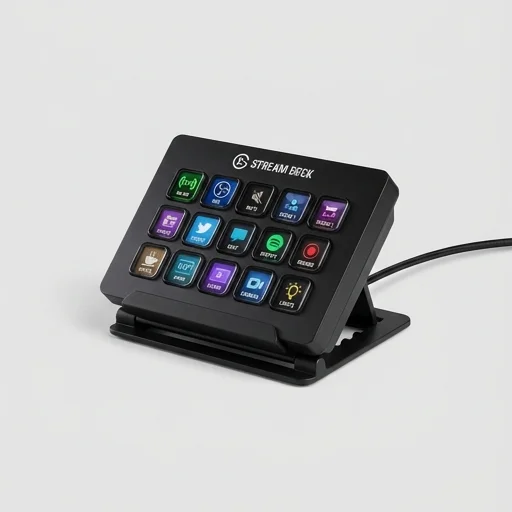
Elgato Stream Deck
by Elgato
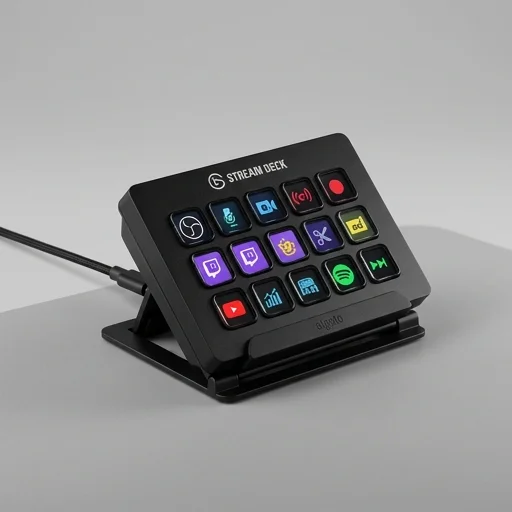
The Elgato Stream Deck remains the gold standard for streamers and content creators who want fast, tactile control over their broadcast software.
The Elgato Stream Deck remains the gold standard for streamers and content creators who want fast, tactile control over their broadcast software. Its combination of customizable keys, deep software integration, and an ever-expanding plugin ecosystem makes complex streaming workflows dramatically simpler. While the base model's 15 keys may feel restrictive for power users and the price sits above generic macro pads, the productivity gains and polish easily justify the investment for serious streamers.
Key features
8 highlights- 15 customizable LCD keys with vivid icons
- Multi-Actions to trigger multiple commands with one press
- Deep integrations with OBS, Twitch, YouTube, and Streamlabs
- Adjustable stand for optimal desk positioning
- Stream Deck software with drag-and-drop profile editor
- Support for folders and multi-page profiles
- Plugin ecosystem via Elgato Marketplace
- Hot-pluggable USB connection
Technical specifications
Manufacturer data, verified on testWhat we liked
6- Dramatically speeds up scene switching and overlay control
- Tactile, satisfying keys with crisp customizable icons
- Huge third-party plugin library for niche integrations
- Intuitive software makes profile creation quick
- Great build quality with a sturdy stand
- Works seamlessly with most major streaming software
What held it back
5- Only 15 keys on base model can feel limiting
- USB cable is somewhat short for some desk setups
- Software occasionally requires updates that reset settings
- Premium price compared to simple macro keyboards
- Icon library customization has a learning curve for beginners
Our full review
22 h on testThe Elgato Stream Deck is a dedicated control surface built for streamers, podcasters, and content creators who need fast, reliable command over their production without fumbling through keyboard shortcuts or alt-tabbing between windows. At its core is a grid of customizable LCD keys, each capable of displaying its own icon, label, or live preview, so you can instantly see what action a button performs rather than memorizing a hotkey. Pressing a key can switch scenes in OBS or Streamlabs, mute your mic, launch a soundboard clip, trigger a Twitch alert, adjust Discord volume, or open an application, all with a single tactile press. The device connects via USB and works alongside your existing streaming software rather than replacing it, acting as a physical dashboard that sits within reach of your keyboard and mouse.
What sets the Stream Deck apart is its software ecosystem, which is where the real customization happens. Elgato's companion app lets users drag and drop actions onto each key, build multi-action sequences, and organize commands across multiple folders or profiles that automatically switch depending on which application is active. Beyond the built-in integrations for OBS, Twitch, YouTube, Discord, and Spotify, the platform supports a large library of third-party plugins created by the community, extending functionality to lighting control, camera switching, social media posting, and even smart home devices. This flexibility means a podcaster might configure their deck for guest introductions and ad-read timers, while a variety streamer sets up per-game overlays and alert triggers, all on the same piece of hardware.
Physically, the Stream Deck comes in several configurations to match different workflows, from the compact Mini with a handful of keys for creators with limited desk space, to the standard model with fifteen keys, up to the XL version offering thirty-two keys for those running complex multi-scene productions. Each key features a bright, customizable display that updates in real time, so icons can change color or swap images to reflect the current state of a toggle, like showing a red mic icon when muted. Built with a sturdy housing and an adjustable stand, it's designed to sit comfortably on a busy desk alongside cameras, microphones, and capture cards. For anyone producing live content regularly, the Stream Deck removes the friction between thought and action, turning multi-step processes into single button presses and helping creators maintain a smoother, more professional broadcast.
What owners say
4 verified reviews · 1,829 votes countedSwitching scenes, muting mic, and triggering alerts used to require alt-tabbing constantly. Now it's one tap. Wish I'd bought this years ago.
The build quality and software are fantastic, but I quickly ran out of keys and had to buy the XL version. Still highly recommend starting here.
Scene collections, filters, and audio mixer controls are all right at my fingertips. The plugin marketplace has tools for basically every app I use.
I use it for podcast production and video editing shortcuts, not just streaming. Super versatile once you learn the software.