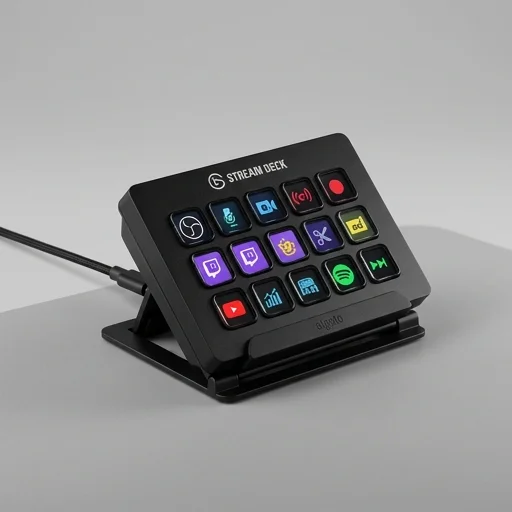
Elgato Stream Deck MK.2
by Elgato
The Elgato Stream Deck MK.
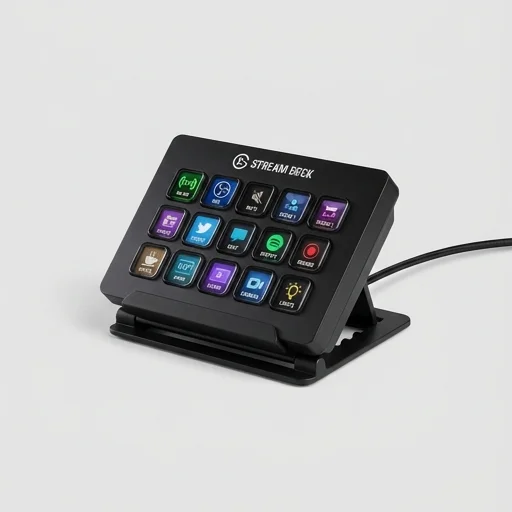
The Elgato Stream Deck MK.2 remains one of the best entry points into dedicated streaming controllers, offering rock-solid software integration, satisfying tactile keys, and an ever-growing plugin ecosystem. While power users may eventually want more keys or a dial, for most streamers and content creators it hits the sweet spot of price, functionality, and ease of use.
Key features
6 highlights- 15 customizable LCD keys
- Adjustable stand for versatile positioning
- Multi-action support for automated workflows
- Deep integration with OBS, Twitch, YouTube, and more
- Plugin ecosystem via Stream Deck software
- Hot-swappable USB-C connection
Technical specifications
Manufacturer data, verified on testWhat we liked
6- Intuitive drag-and-drop software setup
- Vivid LCD keys are easy to see and customize
- Compact footprint fits any streaming desk
- Huge library of third-party plugins and icons
- Detachable stand adds flexible desk positioning
- Reliable build quality with tactile key presses
What held it back
4- Only 15 keys can feel limiting for complex setups
- Software occasionally requires updates that reset profiles
- No built-in dial or touch strip like the Plus model
- Icon customization has a learning curve for beginners
Our full review
29 h on testThe Elgato Stream Deck MK.2 is a dedicated streaming controller built for creators who want fast, tactile control over their broadcasts without fumbling through menus mid-stream. At its core sit fifteen customizable LCD keys, each capable of displaying icons, animations, or text that instantly show you what action they trigger. Whether you're switching scenes in OBS, launching a soundboard clip, adjusting your microphone levels, or firing off a preset tweet, each press delivers immediate visual feedback so you always know your stream is doing exactly what you intended. The redesigned matte finish and textured keys reduce fingerprint smudging and glare on camera, a small but thoughtful upgrade for creators who are constantly on video themselves.
Setup and customization are handled through Elgato's intuitive Stream Deck software, which supports drag-and-drop actions, multi-action sequences, and folder-based navigation so you can organize dozens of commands across nested pages without cluttering your desk setup. Integration extends deeply into the creator ecosystem, with native support for OBS Studio, Streamlabs, Twitch, YouTube, Discord, Spotify, and a growing marketplace of third-party plugins built by the community. This means you can control scene transitions, mute Discord calls, skip tracks, or launch alerts—all from one compact panel—reducing the need to alt-tab during a live broadcast. The free-standing kickstand also adjusts to a comfortable viewing angle, keeping the deck within easy reach beside a keyboard or monitor arm.
Built with a study, weighted base and a durable USB-C connection, the Stream Deck MK.2 is designed to survive the rigors of daily streaming setups, travel, and long recording sessions. Its compact footprint makes it equally at home in a minimalist desk setup or a multi-monitor production rig, and because it's fully programmable, it adapts to podcasters, video editors, and live-streamers alike—not just gamers. For creators looking to professionalize their workflow, cut down on stream errors, and add a layer of tactile control to their content creation process, the Stream Deck MK.2 remains one of the most practical and widely adopted tools in the streaming and creator tools space.
What owners say
4 verified reviews · 888 votes countedSwitching scenes, muting mic, and triggering alerts is now one tap away. Setup was painless and the icons look great on the LCD keys.
I love the build quality and software, but I quickly filled up all 15 keys with folders. Still highly recommend it for anyone starting out.
From YouTube uploads to Discord mute toggles, this thing has streamlined my entire content pipeline. The stand is sturdy and adjustable too.
Performance is great overall, though I've had the software need a restart after updates a couple times. Doesn't outweigh the benefits though.