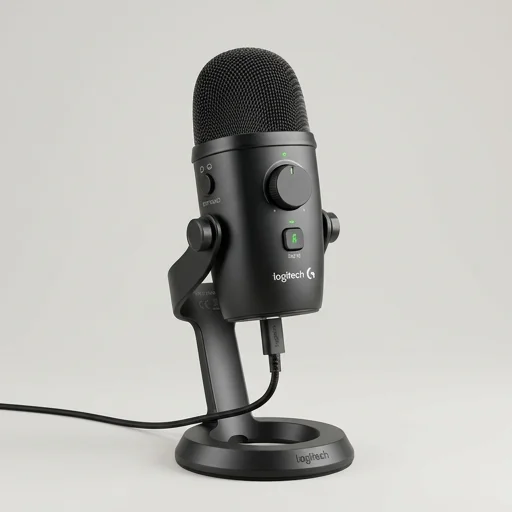
Logitech Yeti Nano
by Logitech
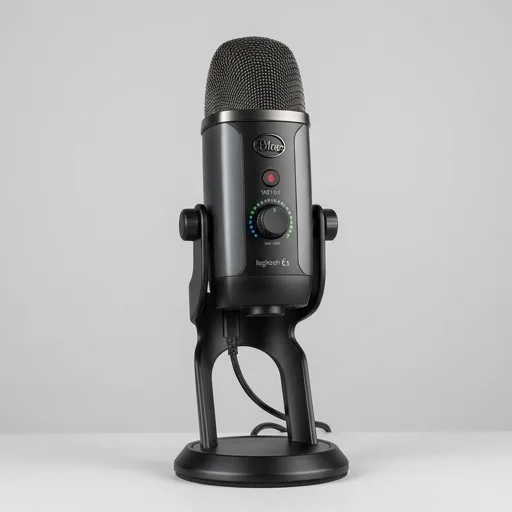
The Logitech Yeti Nano delivers surprisingly rich, broadcast-ready audio in a compact package, making it a strong pick for streamers, podcasters, and remote workers who want quality sound without the bulk or complexity of larger USB mics.
The Logitech Yeti Nano delivers surprisingly rich, broadcast-ready audio in a compact package, making it a strong pick for streamers, podcasters, and remote workers who want quality sound without the bulk or complexity of larger USB mics. It's not the most feature-rich option in the Yeti lineup, but for its size and price, it punches well above its weight.
Key features
6 highlights- Two selectable polar patterns: cardioid and omnidirectional
- 24-bit/48kHz studio-quality audio via custom condenser capsules
- Plug-and-play USB connectivity for Windows and Mac
- Built-in headphone jack with zero-latency monitoring
- Compact, tapered design with adjustable desktop stand
- Blue VO!CE software compatibility for voice effects and filters
Technical specifications
Manufacturer data, verified on testWhat we liked
5- Excellent sound clarity for its compact size
- Simple plug-and-play setup with no drivers needed
- Sturdy build with a sleek, space-saving design
- Zero-latency monitoring is handy for streamers
- Works great for podcasts, voiceovers, and Discord calls
What held it back
4- No gain control dial on the mic itself
- Only two polar patterns compared to bigger Yeti models
- Stand is fixed height, limiting positioning flexibility
- Picks up background noise more than higher-end mics
Our full review
27 h on testThe Logitech Yeti Nano is a compact condenser microphone built for streamers, podcasters, and content creators who need studio-quality sound without the bulk of a full-size setup. Shrunk down from its larger Yeti siblings, the Nano still packs custom condenser capsules that capture rich, broadcast-ready audio, making it a favorite among Twitch streamers and YouTube creators who want their voice to stand out over game audio or background music. Its plug-and-play USB connectivity means there's no need for complicated audio interfaces or mixers, so creators can go from unboxing to broadcasting in minutes.
What sets the Yeti Nano apart in the crowded creator-tools space is its dual pattern selection, offering cardioid and omnidirectional modes to suit solo streaming sessions or multi-guest podcast recordings. The cardioid setting isolates the speaker's voice while rejecting keyboard clatter and room noise, a critical feature for gamers and commentators who need clean audio amid chaotic backgrounds. Switch to omnidirectional, and the Nano becomes an ideal tool for interviews, co-streams, or roundtable discussions, picking up voices from multiple directions with equal clarity. A real-time zero-latency headphone jack lets creators monitor their audio as they speak, catching any issues before they ever reach a livestream or recording.
Beyond its audio chops, the Yeti Nano is designed with the aesthetics and ergonomics that streaming setups demand. Its glossy, rounded housing sits atop a sturdy, adjustable stand that fits neatly beside webcams, ring lights, and capture cards on any desk, while an available shock mount option minimizes vibrations from desk taps or controller clicks. A mute button with an LED indicator gives creators instant, tactile control during live broadcasts, and the multicolored finish options let users match the mic to their branded streaming setup. For creators building out a professional-feeling channel without investing in an XLR rig, the Logitech Yeti Nano delivers a dependable, high-fidelity centerpiece for their content creation toolkit.
What owners say
4 verified reviews · 1,296 votes countedI was skeptical about the smaller size compared to the original Yeti, but the sound quality is fantastic. Clear vocals and great background rejection in cardioid mode.
Sounds professional right out of the box. Wish it had a built-in gain knob, but otherwise it's been reliable for months of recording.
Compact and easy to set up. The omnidirectional mode is nice for group calls. Only downside is the fixed stand height.
Friends immediately noticed the audio improvement. Zero-latency monitoring through the headphone jack is super convenient.